

Please Fill Out the Following Form So We Can Transfer Your Sub-Account to Your New Agency
The Powerful Progress Program videos will directly instruct all setup steps from here.
Make sure to put us on your email friendly list or at least be checking your spam folder for further communications as needed during this transition.
Note: if you are exporting an account to another agency, but not your own, please take the same steps but the new Agency owners are going to need to accept the transfer in their agency level before your account will be accessible. We strongly suggest instead taking this moment to upgrade to your own account as an alternative.
If You Are Transferring A Sub-Account To Another Company's Agency
To transfer a GoHighLevel sub-account, the originating agency (this is form is for us to act on and will alert us at Magnetix Marketing to do so) finds the sub-account in their Agency View, selects "Transfer Sub-account" from the actions menu, enters the receiving agency's Relationship Number and confirms. You must be providing us with an accurate Agency Relationship Number.
The receiving agency then gets an email and must log in to approve the pending request within their Agency View to complete the instant transfer, which moves most data but requires manual reconnection of domains, integrations, and some settings.
We're happy to help with some of these steps despite detailing them on video in the Powerful Progress Program Video Series.
If you are using a system other than GHL for your current CRM, you can send us an email for assistance with transferring your contact data from our system to your new CRM, but that's usually for the company you are transferring to.
If you are obtaining your OWN agency, and stepping out onto your own, we congratulate you for your newfound expertise and freedom! We're happy you've taken this step to graduate to take yet more control over your creative endeavors! It's very likely that our FIRST videos in our training sequences are exactly what you should be referring to for help in this process.
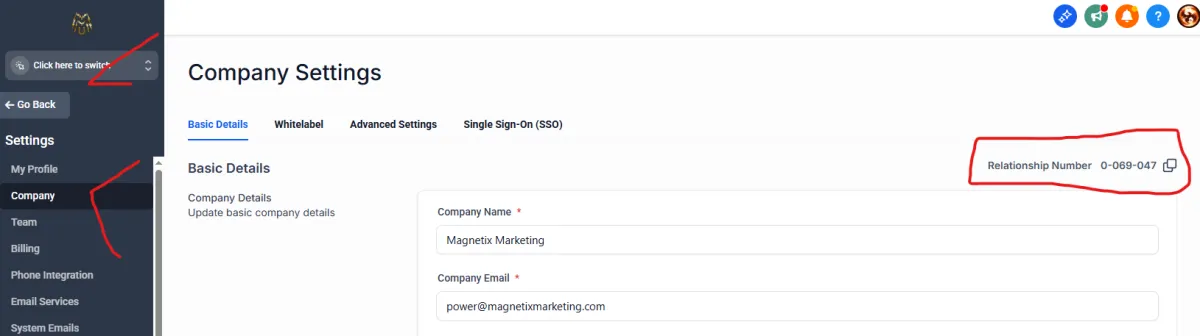
Here's an image of where you'll find your new agency's Relationship Number (Agency level so it should say Click Here to Switch, and Settings side which is found in the bottom of the front side of the control panel. Then at the top of the control panel, 'Company' and there under Basic Details on the far right you should see your Relationship Number.)
Again, if this is not YOUR agency we are transferring to then the company there will have to get you this number so you can come back here to submit or let us know by email.

Magnetix Marketing
www.magnetixmarketing.com
Phone: (702) 766-8301
Las Vegas, NV 89121
© Copyright: Magnetix Marketing, 2026. All Rights Reserved.
This site is not a part of the Facebook website or Facebook Inc. Additionally, This site is NOT endorsed by Facebook in any way. FACEBOOK is a trademark of FACEBOOK, Inc.